
How I Know Which AI Agent Needs Me (and When)
tmux Silence Detection for Multi-Agent Workflows

When you’re running 18 Claude Code agents across 6 tmux sessions, the biggest UX problem isn’t the AI–it’s knowing which one is waiting for you.
The Problem
I run a multi-agent Claude Code setup for development. Different agents handle different concerns–one leads infrastructure, another writes code, another manages job search prep, and a whole squad works on a Rails app. Each agent gets its own tmux window, organized into sessions by project: WertLead and WertCoder in one session, the Orthodox Daily squad in another, and so on.
The workflow is asynchronous by nature. I give an agent a task, switch to a different window, do something there, and at some point need to check back. But when? An agent might finish in 10 seconds or 10 minutes. Without cycling through every window manually, I don’t know who’s done and who’s still working.
I tried a few notification approaches before landing on something built entirely from what tmux already provides.
The Insight: Silence Means “Waiting”
Claude Code produces continuous output while it works–streaming text, tool call results, progress indicators. When it finishes and drops back to the input prompt, the pane goes silent. That silence is the signal.
tmux has a built-in feature for this: monitor-silence. Set a timeout on a window, and after N seconds of no output, tmux flags it and fires a hook. No polling. No custom watchers. No process inspection.
# In tmuxinator config, per agent window:
- WertLead:
    layout: main-vertical
    options:
      monitor-silence: 20
    panes:
      - claude-code-launch WertLead
      - yazi
      - zsh
20 seconds is the sweet spot. Short enough to catch idle agents quickly, long enough to avoid false positives during brief pauses in output (like when Claude thinks between tool calls).
The Visual: Gold Means “Come Talk to Me”
When a window’s silence timer fires, tmux sets an internal flag. There’s a style for flagged windows: window-status-activity-style. The default is reverse, which flips your foreground and background colors. It looks terrible.
Override it:
set -g window-status-activity-style "fg=colour220,nobold,noreverse"
Now any window waiting for input shows gold text in the status bar. The focused window gets a gold background with bold black text:
set-window-option -g window-status-current-style "bg=colour220,fg=#000000,bold"
Three states, one glance (the “Wertzy” window is a local Fizzy fork for kanban tracking–not an agent, just a neighbor):
- Gold background, black bold text–the window you’re in
- Gold text–agents waiting for your input
- Gray text–agents still working (or non-agent windows like yazi, zsh)
tmux handles the flag lifecycle natively. Gold appears when silence is detected, disappears when the agent starts producing output again. No per-window style management, no cleanup scripts.
macOS Notifications for When You’re Elsewhere
The gold text only helps if you’re looking at the tmux status bar. When you’re in a browser, a design tool, or making lunch, a hook script pushes a macOS notification:
set -g silence-action any
set -g visual-silence off
set-hook -g alert-silence[0] 'run-shell -b "~/.config/agent-attention.sh \"#{hook_window_name}\" \"#{hook_session_name}\""'
The important settings:
silence-action any–fire the hook for all sessions, not just the one in viewvisual-silence off–suppress tmux’s built-in message (we’re handling it ourselves)-bonrun-shell–non-blocking, so the script doesn’t freeze tmux
The notification script guards against non-agent windows, rate-limits to one notification per agent per 3 minutes, captures the last few lines of output for context, and calls osascript:
osascript -e "display notification \"${context}\" \
  with title \"Agent Ready\" \
  subtitle \"${display_name} @ ${session}\""
Rate limiting matters. Without it, every re-evaluation of the silence timer on an idle agent fires another notification. The approach is a state file per agent: touch it when notifying, check its mtime before the next one. Under 180 seconds? Skip.
Cleaning Up the Status Bar
monitor-silence sets a ~ flag on windows, and tmux’s default format renders all flags. Every monitored window gets a trailing ~, which is noisy. Override the format to show only what you actually use:
set -g window-status-format ' #I:#W#{?window_zoomed_flag,Z,} '
set -g window-status-current-format ' #I:#W#{?window_zoomed_flag,Z,} '
This keeps the zoom indicator (Z) and drops everything else. The gold color change IS our silence indicator–the ~ character is redundant noise.
Resetting When You Visit
When you switch to a waiting agent’s window, a hook clears the rate-limit state for that agent. If it goes idle again after your interaction, it can notify immediately instead of waiting out the old cooldown:
set-hook -g after-select-pane[0] 'run-shell -b "~/.config/agent-attention-reset.sh \"#{window_name}\" \"#{session_name}\""'
set-hook -g after-select-window[0] 'run-shell -b "~/.config/agent-attention-reset.sh \"#{window_name}\" \"#{session_name}\""'
Two hooks: after-select-pane fires when switching panes within a window, after-select-window fires when switching between windows. Both are needed to cover all navigation paths.
Things I Learned the Hard Way
window-status-activity-style defaults to reverse. If you’re setting per-window window-status-style and the colors look backwards, this is why. Set noreverse explicitly or you’ll spend an hour wondering why your foreground is your background.
alert-silence fires once per silence event, not on a loop. After the hook runs, it won’t fire again until the window produces output and then goes silent again. This is ideal–the system self-regulates. I wrote a bunch of deduplication logic before realizing tmux already handles it.
pane-focus-in is broken in tmux 3.5a. It accepts the set-hook command without error but never shows up in show-hooks output and never fires. Wasted an afternoon on that. Use after-select-pane and after-select-window instead.
Let tmux do the visual work. My first version tried to manage per-window styles from shell scripts–setting colors on notification, unsetting on reset. Race conditions, stale state, ugly edge cases. The final version uses zero per-window style management. window-status-activity-style handles everything through tmux’s native flag system. Fewer moving parts, no cleanup.
The Full Setup
Everything required:
- 7 lines in
.tmux.conf(settings + hooks) - One notification script (~30 lines)
- One reset script (~10 lines)
monitor-silence: 20in each agent window’s tmuxinator config
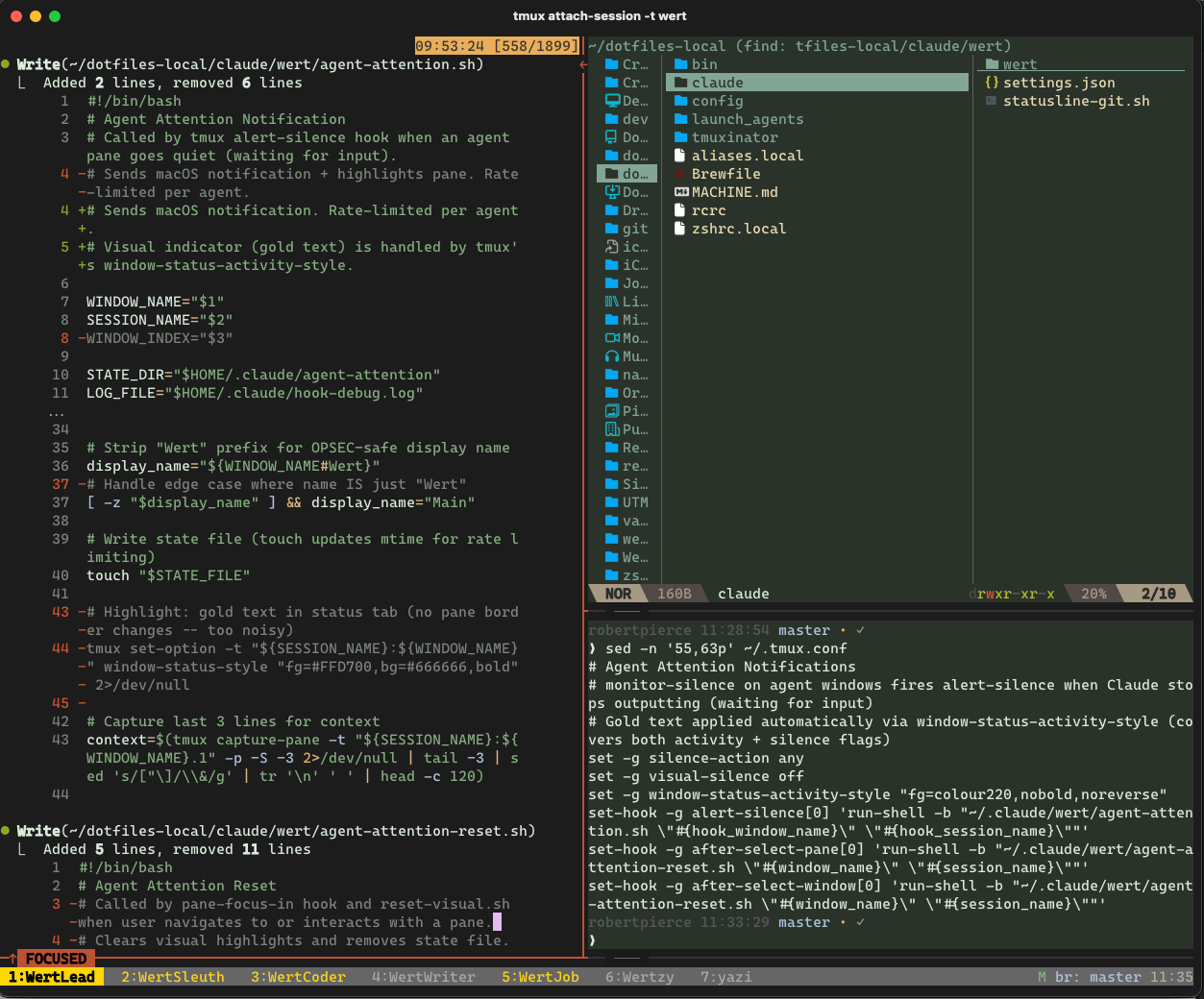
For 18 agents across 6 sessions, the difference was immediate. Instead of cycling through windows hunting for who needs me, I glance at the status bar or wait for a tap on the shoulder from macOS. Gold means “come talk to me.” Everything else means “still working, leave me alone.”
For your agent
Everything above was written for you. This section is written for your AI coding agent.
Copy everything below into your agent’s context and ask it to add silence-based attention notifications to your tmux setup. The config, scripts, and hooks are structured so an agent can implement them directly.
Prerequisites
- tmux 3.3+ installed (
tmux -Vto check; 3.5a confirmed working) - tmuxinator installed (
gem install tmuxinator) with at least one agent config - A CLI-based AI agent running in tmux panes (Claude Code, Aider, Codex CLI, etc.)
- macOS for the notification script (Linux users: replace
osascriptwithnotify-send)
Already doing this?
- Already have
monitor-silenceset? Skip to the visual indicator config. - Already have gold styling? Skip to the notification script.
- Already getting notifications but too many? Add the rate-limiting and reset hooks.
- Already have everything but seeing
~flags cluttering the status bar? Skip to the window format override.
Implementation checklist
- Add
monitor-silence: 20to each agent window in your tmuxinator config - Add
window-status-activity-styleto.tmux.conf(gold text,noreverse) - Add
window-status-current-styleto.tmux.conf(gold background, black bold) - Override
window-status-formatandwindow-status-current-formatto suppress the~flag - Create the notification script at
~/.config/agent-attention.sh - Create the reset script at
~/.config/agent-attention-reset.sh - Create the state directory:
mkdir -p /tmp/agent-attention - Add
silence-action anyandvisual-silence offto.tmux.conf - Add the
alert-silencehook to.tmux.conf - Add
after-select-paneandafter-select-windowreset hooks to.tmux.conf - Make both scripts executable:
chmod +x ~/.config/agent-attention.sh ~/.config/agent-attention-reset.sh - Reload tmux config:
tmux source-file ~/.tmux.conf - Test: switch to an idle agent window, wait 20 seconds, confirm gold text appears in status bar
- Test: switch to a different app, wait for a macOS notification from an idle agent
Key artifacts
tmux.conf additions (all 7 lines):
# Silence detection styling
set -g window-status-activity-style "fg=colour220,nobold,noreverse"
set-window-option -g window-status-current-style "bg=colour220,fg=#000000,bold"
set -g window-status-format ' #I:#W#{?window_zoomed_flag,Z,} '
set -g window-status-current-format ' #I:#W#{?window_zoomed_flag,Z,} '

# Silence notification hooks
set -g silence-action any
set -g visual-silence off
set-hook -g alert-silence[0] 'run-shell -b "~/.config/agent-attention.sh \"#{hook_window_name}\" \"#{hook_session_name}\""'

# Reset rate limit on navigation
set-hook -g after-select-pane[0] 'run-shell -b "~/.config/agent-attention-reset.sh \"#{window_name}\" \"#{session_name}\""'
set-hook -g after-select-window[0] 'run-shell -b "~/.config/agent-attention-reset.sh \"#{window_name}\" \"#{session_name}\""'
Notification script (~/.config/agent-attention.sh):
#!/bin/bash
# Agent attention notification with rate limiting
# Called by tmux alert-silence hook

WINDOW_NAME="$1"
SESSION_NAME="$2"
STATE_DIR="/tmp/agent-attention"
COOLDOWN=180  # seconds between notifications per agent

# Skip non-agent windows (adjust this list to match your setup)
case "$WINDOW_NAME" in
  yazi|zsh|bash|vim|nvim) exit 0 ;;
esac

mkdir -p "$STATE_DIR"
STATE_FILE="${STATE_DIR}/${SESSION_NAME}-${WINDOW_NAME}"

# Rate limit: skip if notified recently
if [ -f "$STATE_FILE" ]; then
  LAST=$(stat -f %m "$STATE_FILE" 2>/dev/null || stat -c %Y "$STATE_FILE" 2>/dev/null)
  NOW=$(date +%s)
  ELAPSED=$(( NOW - LAST ))
  [ "$ELAPSED" -lt "$COOLDOWN" ] && exit 0
fi

# Capture last few lines of output for notification context
CONTEXT=$(tmux capture-pane -t "${SESSION_NAME}:${WINDOW_NAME}" -p 2>/dev/null | grep -v '^$' | tail -2 | head -c 200)

# Send macOS notification
DISPLAY_NAME="$WINDOW_NAME"
osascript -e "display notification \"${CONTEXT}\" with title \"Agent Ready\" subtitle \"${DISPLAY_NAME} @ ${SESSION_NAME}\"" 2>/dev/null

# Update state file
touch "$STATE_FILE"
Reset script (~/.config/agent-attention-reset.sh):
#!/bin/bash
# Clear rate-limit state when navigating to an agent window
# Called by tmux after-select-pane and after-select-window hooks

WINDOW_NAME="$1"
SESSION_NAME="$2"
STATE_FILE="/tmp/agent-attention/${SESSION_NAME}-${WINDOW_NAME}"

[ -f "$STATE_FILE" ] && rm -f "$STATE_FILE"
tmuxinator per-window config (add to each agent window):
- AgentName:
    layout: main-vertical
    options:
      monitor-silence: 20
    panes:
      - your-agent-launch-command
      - zsh
Concepts to remember
- Silence = idle. CLI agents produce continuous output while working. When output stops for 20 seconds, the agent is waiting for input. This is the only signal you need.
- tmux handles the visual lifecycle.
window-status-activity-styleapplies automatically when the silence flag is set and clears when the window produces output again. No script cleanup required. - One notification per silence event.
alert-silencefires once when silence is first detected, not repeatedly. The rate limiter is a safety net for edge cases, not the primary deduplication. - Reset on navigate. Clearing the rate-limit state when you visit an agent window means the next idle period gets a fresh notification. Without this, you’d miss notifications during the cooldown after your last visit.
silence-action anyis critical. Without it, tmux only fires the hook for the current session. If you’re in session A and an agent in session B goes idle, you won’t get notified.
Pitfalls
window-status-activity-styledefaults toreverse. If you don’t override it, flagged windows get inverted colors instead of your intended styling. Always setnoreverseexplicitly.pane-focus-indoes not work in tmux 3.5a. It accepts the hook silently but never fires. Useafter-select-paneandafter-select-windowinstead.- Missing
-bonrun-shellwill block tmux’s command queue while the script runs. Always use the non-blocking flag. statsyntax differs between macOS and Linux. macOS usesstat -f %m, Linux usesstat -c %Y. The notification script above includes both with a fallback.- Non-agent windows will trigger silence. A plain zsh prompt is always “silent.” Filter these out by name in the notification script’s case statement, or only set
monitor-silenceon agent windows in your tmuxinator config.